
Start with a programme
Open a programme ready to personalise and adapt its exercise selection to your patient's goals.
Programmes and exercises
Manu helps physiotherapists and osteopaths prepare personalised exercise programmes. Use the library, your own exercises or AI suggestions from the clinical report: you choose the exercises, instructions and schedule that the patient receives in Théra.
Watch the demonstration on its own page and share the link →
This workflow, filmed in Manu on a computer, uses Jean Dudemo's fictional record.
For the next part of the workflow, see how the patient accesses their programme in Théra and shares feedback.
Choose the way of preparing a programme that suits your session.
Open a programme ready to personalise and adapt its exercise selection to your patient's goals.
Search the library, use the filters and add your own exercises to keep your familiar way of working.
From the clinical report, request exercises or a programme in one click. Check the suggestion, then keep what suits the patient.
The programme takes shape around what you have agreed together.
The clinical report provides a starting point; your clinical reasoning and the patient's goals and constraints guide the final selection.
From treatment plan to programme →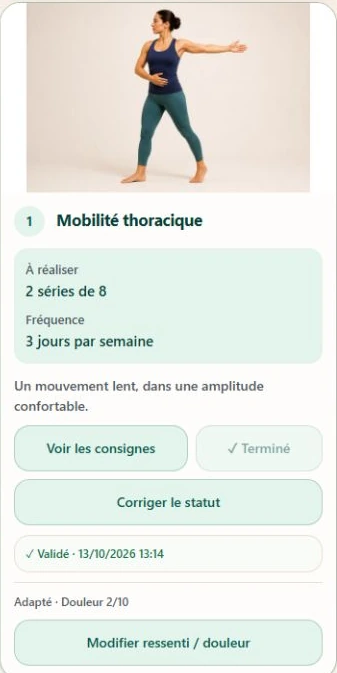
The patient accesses your instructions in Théra; you review their feedback in Manu.
Invite the patient to access their programme in the Théra app, using the email address to which the invitation was sent.
They access the scheduled exercises, read your instructions, report how they feel and complete questionnaires.
Before the next appointment, review completed activities and answers in the patient's record. You can then adjust the programme.
A finding from research into support for home exercises.
Useful information to get started.
Yes. You can add your own exercises and combine them with the library to build the patient's programme.
No. It suggests exercises or a programme based on the clinical report. You check the suggestions and adapt the exercises, instructions and schedule.
In Théra, the patient app. They sign in using the email address to which their invitation was sent and a temporary code.
Their record contains completed activities, reported feelings and questionnaire answers sent from Théra, helping you prepare the next appointment.
Explore this workflow alongside your usual way of working for 3 weeks.
Page updated on 21 October 2026.