
Choose a time slot
Check your calendar, select an available slot and enter the patient and reason for the appointment.
Calendar, patient records and video consultations
Manu brings together the practitioner's calendar and patient records to prepare sessions in the practice or by video. Appointments, history, clinical reports and Théra feedback help you find the information you need before each consultation.
Watch the demonstration on its own page and share the link →
This workflow filmed in Manu uses Jean Dudemo as a fictional patient.
The demonstration shows how to prepare a session using history and feedback available in the same record.
Appointments and preparation belong to the same workflow.
Check your calendar, select an available slot and enter the patient and reason for the appointment.
The appointment appears in the calendar. Open it to find the information you need for the session.
Review the history, previous clinical report, progress assessment, programmes and useful feedback before the consultation.
Keep your booking habits and import the appointments you need into Manu.
Add Doctolib appointments to the Manu calendar using the import workflow. Check the selection before confirming it.
You can make your Doctolib link available in the patient app for bookings.
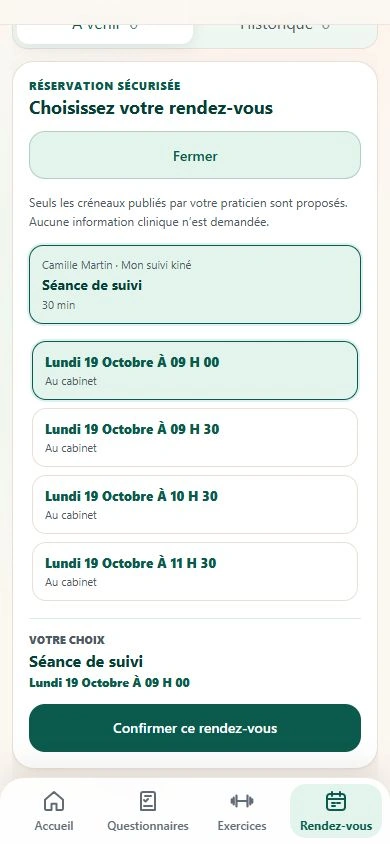
You can also offer time slots directly in Théra, where patients choose their appointment.
Retrieval options depend on your device. This deliberate import does not set up continuous synchronisation: a later change in Doctolib requires a new import and another check.
The record gives context to the appointment, in the practice and remotely.
When remote follow-up is suitable, your patient joins you from Théra.
Open the patient's relevant information in Manu and prepare the topics to revisit during the appointment.
The patient signs in, opens their invitation in Théra and joins the room once you admit them.
Prepare the clinical report from your notes, adjust the instructions and programme if needed, then review the next feedback.
An example of physiotherapy research to put the value of remote follow-up in context.
Tools and information to complement your organisation.
Useful information to get started.
Yes, using the optional import workflow in the Manu calendar. You check and confirm the appointments to add. It is not continuous synchronisation.
You can offer time slots in Théra or provide your Doctolib link. The patient uses the booking method you offer.
Yes, they are included in active Manu subscriptions. The terms of service set out the scope: two adult participants, up to 120 minutes and no call recording.
In the patient's record: documents, history, progress assessments, programmes and feedback from Théra, including completed activities, reported feelings and questionnaires.
No. It depends on the French national health insurance conditions and the practitioner's situation. Manu's FAMI eligibility remains to be confirmed contractually and under the applicable regulations. See the FAMI page for useful supporting documents.
Explore this workflow alongside your usual way of working for 3 weeks.
Page updated on 21 October 2026.